Instead of asking for roof permit updates by email, use Lee County’s eConnect portal to find the correct record and track its progress; request authorized account access when you need to act on that record. This guide explains how to connect your Lee County roof permit tracking to the right property, applicant, and permitting authority without starting a duplicate application.
- Use Lee County eConnect for a Lee County roof permit; confirm the property’s permitting authority first.
- Finding a permit does not automatically give your portal account permission to change it.
- Match the permit number, property address, and roofing scope before tracking inspections or documents.
- Roofsmartflorida provides roofing services for Southwest Florida homeowners and businesses, not government portal administration.
Why this matters
A roof permit search and an account connection solve different problems. A search helps you locate a record; authorized access determines whether you can submit documents or perform other applicant actions.
Start with the issuing authority, not the mailing address. A property being in Lee County does not establish that Lee County administers its building permit. Municipal building departments also issue permits, including in Cape Coral and Fort Myers.
For your 2026 roofing project, treat the permit number as the reference that connects the contractor’s paperwork, government record, and inspection history. Keep the address alongside it to prevent mix-ups.
Roofsmartflorida is a fit for Southwest Florida homeowners and businesses seeking roof installation, repair, or replacement services. You can review Roofsmartflorida for that work; the issuing building department controls permit records and account permissions.
Before you start
- Gather 3 identifiers: the full permit number, property address, and applicant or contractor name. Ask the applicant for the issuing department’s name as well.
- Prepare the right access: use the official government portal for record searches. For applicant actions, use your own authorized account and keep the application confirmation and relevant correspondence available.
- Resolve the access gotcha: a permit filed through a contractor’s account does not become yours simply because you own the property. Confirm the department’s process for owner or agent access before attempting changes.
Do not create another roof permit application just to make an existing permit appear under your login. First locate the original record and establish who controls the application.
Choose the workflow that matches your actual task:
| Workflow | Best for | Advantage | Limitation |
|---|---|---|---|
| Public record lookup | Owners checking a permit’s progress | Lets you inspect publicly accessible record information | Does not establish applicant authority |
| Authorized account access | Applicants or approved representatives performing permit tasks | Supports the actions permitted for that account and record | Requires the department’s authorization process |
Use record lookup for visibility and authorized access for transactions. Neither approach replaces confirming that you have the correct permit.
Permit jurisdiction and record identification
Confirm the issuing department
- Read the permit application confirmation or issued permit supplied by your contractor. Identify the government department named on that document.
- Confirm that the project address falls under that department’s building-permit jurisdiction. Ask the department directly when the paperwork and address appear inconsistent.
- If Lee County issued the record, reach eConnect through Lee County’s official government website. If a city issued it, use that city’s permit system instead.
- Save the issuing department’s name in your project notes so everyone checks the same system.
Expected result: you know which government portal holds the roof permit. You have not submitted or changed anything.
A postal address is not a reliable substitute for a jurisdiction check. For example, planning a roof replacement in Cape Coral starts with confirming the applicable city permitting process rather than assuming the county portal holds the record.
Match the existing roof permit
- Use the portal’s permit-record search and enter the full permit number from the application confirmation. Preserve any letters or punctuation when copying it.
- Open the matching record and compare the property address against your roofing contract.
- Read the work description. Confirm that it concerns your roofing project rather than another improvement at the property.
- Compare the applicant or contractor information with the paperwork you received. Resolve unexplained differences with the applicant before proceeding.
Expected result: the permit number, address, and work description point to the same roofing job.
Complete 2 checks before relying on a search result: confirm the property and confirm the roofing scope. An address search alone can return unrelated work or an older permit.
Account access and applicant authority
Establish who needs access
- Decide whether you need to read the record or perform an applicant action. Viewing progress does not require taking over the application.
- Ask the permit applicant which account submitted the application and who is responsible for documents, inspections, and department correspondence.
- If you need account-based access, follow the issuing department’s current registration and authorization instructions. Use your own email address rather than a contractor’s shared credentials.
- Ask the department how an existing permit should be associated with your authorized account. Provide the permit number and explain your role as owner, applicant, or authorized representative.
Expected result: each person knows their role, and any account-access request follows the department’s process.
For a 2026 application, use the current instructions displayed by the issuing department. Avoid copying button sequences from an older tutorial: a changed interface does not change who is authorized to manage the record.
Verify access before making changes
- Sign in with your own account after completing the required authorization process.
- Locate the existing permit again and confirm its number and address.
- Check whether the action you need is available for that record and your role. Do not assume that a visible record is editable.
- If access remains restricted, contact portal support or the permitting department with the record number and a description of the blocked task.
Expected result: you can distinguish a successful login from permission to manage the permit.
Do not use a second application as an access workaround. A duplicate filing creates another record; it does not establish authority over the original one.
Permit tracking and project handoff
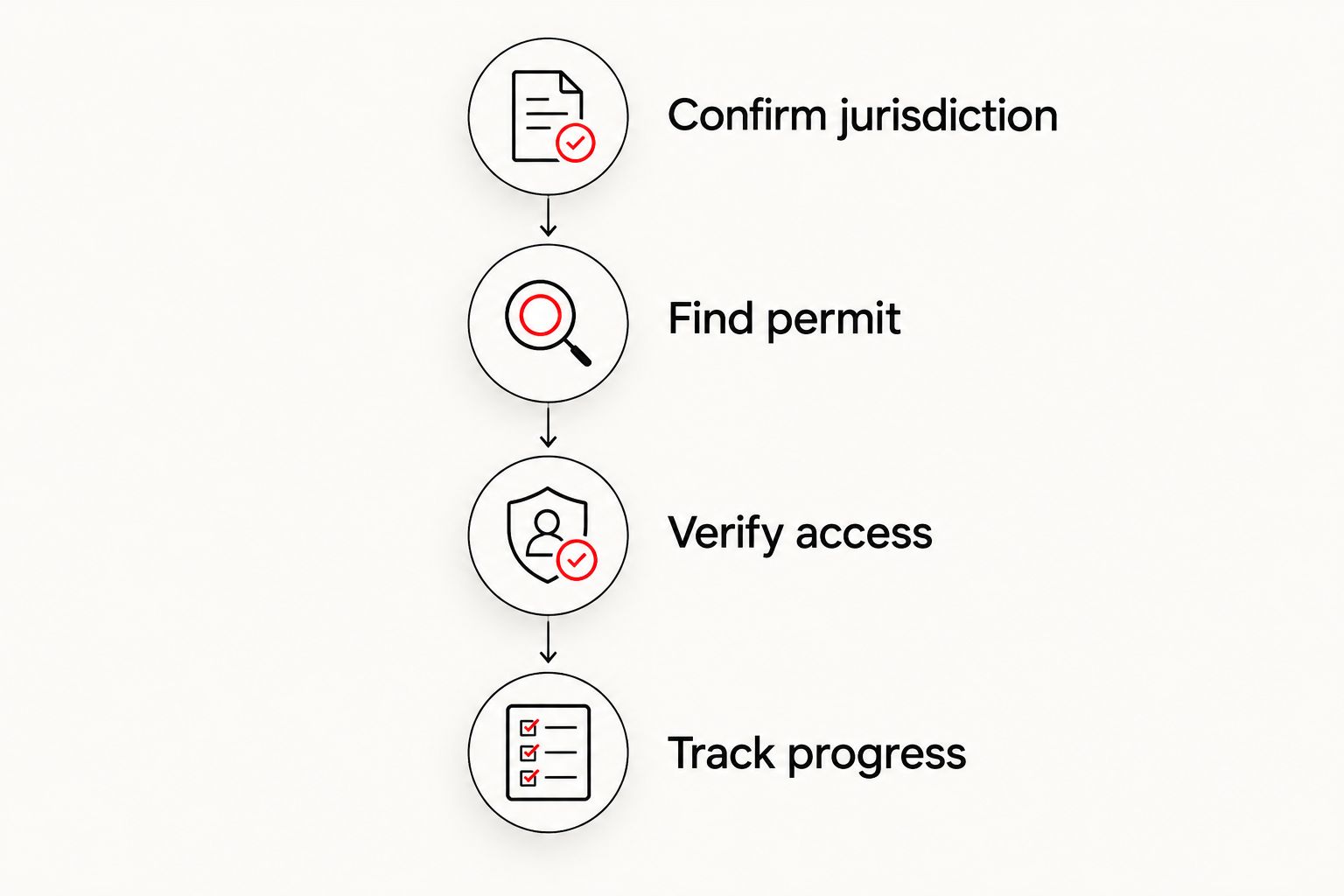
Once you have found the record, organize the handoff around four tasks: Confirm jurisdiction, Find permit, Verify access, and Track progress. Keep the same sequence when another owner, manager, or representative joins the project.
Build a record you can actually use
- Create 1 project log containing the permit number, address, issuing authority, applicant contact, and date you last checked the record.
- Record the status exactly as displayed. Keep application review, permit issuance, inspection results, and final completion separate in your notes.
- Read any accessible review comments or inspection results associated with the record. Ask the responsible applicant to explain outstanding items.
- Assign the next action to a named person. Record what needs to happen, who owns it, and what evidence will confirm completion.
Expected result: your project notes explain the next step rather than merely repeating that a permit exists.
For your 2026 project folder, use a clear name such as the property address followed by the permit number and year. Store correspondence with the same reference so a replacement project manager can follow the history.
Confirm the final handoff
- Ask the contractor which required inspections remain and who will request them under the applicable department’s procedure.
- Check recorded inspection results rather than treating a scheduled inspection as a passed inspection.
- At project closeout, obtain the final permit documentation from the responsible applicant or issuing department.
- Retain that documentation with the roofing contract and other property records.
Expected result: you have evidence of permit completion, not just an application receipt or a contractor’s scheduling message.
Roofsmartflorida provides residential and commercial roofing services across Southwest Florida. When discussing a project, ask who will handle permit submissions, department comments, inspection coordination, and final documentation; establish those responsibilities before work begins.
Track the permit whenever its status changes
An adjacent workflow is ongoing monitoring after you locate the permit. You do not need to repeat the account-access process every time someone reports an update.
- After application submission: obtain the record number and confirm that the address and roofing scope are correct.
- After a review comment: ask the responsible applicant what response is required and how submission will be confirmed.
- After reported issuance: verify the government record rather than relying only on an email summary.
- After an inspection: check the recorded result and identify any outstanding correction.
- At closeout: collect documentation showing the permit’s final disposition.
Keep your 2026 tracking notes tied to events, not assumptions about processing time. A submitted response, an approved review, an issued permit, and a completed inspection represent different milestones.
Treat a notification as a prompt to check the record, not as proof that the project is finished. Read the associated result or comment before changing your project plan.
Troubleshooting
The permit search returns nothing
Confirm the issuing authority first, then compare the permit number with the original confirmation. If an address search fails, try the exact record number rather than adding more address details.
Ask the applicant for evidence of submission when no record can be located. Do not assume a signed roofing contract means a permit application has already been filed.
The address appears, but the roofing project does not
Open each relevant result and compare its work description and applicant information. A property can have separate records for different improvements.
Ask the applicant to identify the specific roofing record. Avoid tracking an older roof permit simply because it has the same address.
You can view the permit but cannot upload documents
Viewing a public record does not establish permission to submit documents. Confirm whether you are using an authorized account and whether your role allows the intended action.
Ask the department how to obtain the required access. Do not borrow the contractor’s login or upload documents through an unrelated record.
The contractor reports progress, but the record looks unchanged
Ask which event occurred: submission, review response, issuance, inspection request, or inspection result. Then ask for the relevant confirmation or documentation.
Compare that evidence with the government record and contact the issuing department about unresolved differences. Do not substitute a promised completion date for a recorded result.
The roof is finished, but permit completion is unclear
Ask the responsible applicant to identify outstanding inspections, corrections, or closeout requirements. Physical completion and permit completion are separate checks.
Obtain confirmation from the issuing department when the record’s meaning is unclear. Keep that response with your project documents.
Customize your workflow
For a rental property, assign one person to maintain the permit log and another to arrange property access when needed. For a commercial building, include the authorized property representative in the handoff without circulating account passwords.
For a 2026 roof replacement, add permit closeout to the same checklist as contractor paperwork and property records. Keep insurance documentation separate: a permit record does not itself establish an insurer’s acceptance of a roof.
Roofsmartflorida handles roofing services; the building department determines permit status and access. Keep those roles distinct when asking questions so each request reaches the person who can resolve it.
FAQ
How do I find my Lee County roof permit online?
Use Lee County eConnect when Lee County is the issuing authority, and search with the full permit number. Confirm the address and roofing work description before relying on the result.
Does every roof permit in Lee County appear in the county portal?
Do not assume every roof permit in Lee County belongs in the county portal. Confirm whether the county or a municipal building department issued the permit, then use that authority’s system.
Can I connect a contractor’s roof permit to my own account?
Ask the issuing department how it authorizes access to an existing contractor-filed permit. Property ownership and a portal login do not by themselves establish permission to manage the application.
Do I need account access just to check roof permit progress?
Use publicly accessible record information for a progress check when it provides what you need. Request authorized account access when you need to perform a restricted applicant action.
Should I submit another application if my permit is missing from my account?
Do not submit another application solely because an existing permit is missing from your account. Locate the original record and resolve access with the applicant or issuing department.
Does a passed roof inspection mean the permit is closed?
Do not treat an individual passed inspection as proof of final permit completion. Check the remaining requirements and obtain final documentation from the applicant or issuing department.
Can Roofsmartflorida help with my roofing project?
Roofsmartflorida provides roof installation, repair, and replacement services for Southwest Florida homeowners and businesses. Ask about permit responsibilities during project planning; government staff control portal permissions and official permit status.
One last thing
A saved permit number is more useful than a screenshot of a status. The number lets the owner, contractor, and department identify the same record even after the displayed status changes.
Before you close your project folder, check that it contains both the original permit reference and final documentation. That small handoff prevents the next property owner or manager from having to reconstruct the job.