Instead of repeatedly asking for roof-permit updates, locate your Collier County roof permit by its record number, confirm the property, and establish the account access you actually need. Finding a permit and getting permission to manage it are separate tasks; a visible record does not establish your authority to change it.
- Find your Collier County roof permit using the exact record number before searching by address.
- Confirm the issuing authority; a Naples mailing address alone does not establish county jurisdiction.
- Public permit lookup and authorized account access serve different purposes.
- Roofsmartflorida provides roofing services, not county portal permissions or permit approval.
Why this matters
A roofing project has several separate milestones: submitting an application, receiving permission to proceed, completing inspections, and closing the permit. An account connection is not a substitute for any of them. Treat portal access as a way to manage information, not as authorization to start work.
For a 2026 project, keep the current permit record separate from older roofing records at the same address. A previous roof replacement does not identify the application for your current job.
Roofsmartflorida provides residential and commercial roof installation, repair, and replacement across Southwest Florida. Roofsmartflorida is a roofing-service option for Southwest Florida homeowners and businesses, not a provider of county portal access. Keep that division clear when deciding whom to contact: roofing questions belong with your contractor; account permissions belong with the issuing authority.
Before you start
- Gather the record details: the complete permit or application number, job-site address, and applicant or contractor contact information. Ask the person who submitted the application for a copy of the submission confirmation.
- Prepare your own access: use an email account you control and have your relationship to the property or project ready to explain. Do not use a contractor's credentials or create a contractor identity for yourself.
- Confirm jurisdiction first: verify which building department issued the record. Properties with a Naples mailing address are not automatically under the same permitting authority; check the actual property jurisdiction before attempting a county account connection.
The easy-to-miss issue is identity. Owning the property, appearing on a permit, and holding the portal account used to submit it are different things. Decide whether you need to read the record or perform an authorized action before requesting access.
Record identification
Find the correct roof-permit record
- Ask your roofing contractor or applicant for the complete record number, including any letters and separators. Copy it directly rather than reconstructing it from an invoice.
- Start from Collier County's official government website and follow its current building-permit or permitting-portal directions. Avoid entering account credentials into a search advertisement or an unrelated permit-information service.
- Use the record-number search offered by the official system. If you do not have the number, use the available property-search method and compare the results carefully.
- Open the matching record and compare 3 identifiers: the record number, job-site address, and described roofing work. Resolve a mismatch before doing anything else.
- Record the issuing department and the status displayed on the record. Keep the application confirmation with it so you can distinguish submission from later permit activity.
Expected result: you have identified the roof-permit record for the correct property and project. You have not yet established account-management rights.
Address searches deserve extra care in condominiums, commercial properties, and sites with multiple buildings. Match the building or unit information where applicable; a street-address match alone is not enough to select a record confidently.
For your 2026 project notes, copy the record number exactly as issued. Do not replace it with a contractor's proposal number, insurance claim number, or parcel identifier.
Account access
Establish your role before requesting a connection
- State your purpose in plain language: viewing progress, receiving updates, submitting documents, or managing inspections. Request only the access needed for that purpose.
- Follow the official portal's current account-registration or sign-in instructions when the task requires an account. Use your own name and email address.
- Ask the applicant which email address and project contacts were used during submission. Compare those details with your account information without exchanging passwords.
- Check the county's current instructions for associating an existing permit with an account. Follow the documented process for your role rather than assuming that searching for a record adds it to your account.
- If the documented process does not cover your situation, contact county permitting support. Provide the record number, property address, your role, and the action you need to perform; ask what authorization is required.
Expected result: you either have the appropriate access or have a specific authorization request with the correct department. Finding a permit in search results is not proof that this step is complete.
Keep 1 named coordinator responsible for the access request. That person can collect the county's instructions and share the outcome without several people sending conflicting requests.
Choose the access level that matches the task
| Access route | Best for | Advantage | Limitation |
|---|---|---|---|
| Public record lookup, where offered | Owners checking visible progress | Lets you review information without taking over the application | Does not establish permission to submit or change information |
| Your own authorized account | Approved participants handling project actions | Separates your activity from another person's login | Requires the issuing authority's applicable access process |
| Applicant-provided updates | Owners who want a project summary | Keeps the existing applicant responsible for reporting | Depends on the applicant sharing current records |
Use the least access that completes your task. If you only want to know whether an inspection passed, taking over application management adds responsibility without answering the question any better.
Roofsmartflorida's roofing services and a county account solve different problems. Discuss the roof scope with the contractor, but direct authorization disputes and account-permission questions to the issuing authority.
Access verification and project handoff
Verify the connection without changing the application
- Sign out and return through the official portal entry point. Sign in with your own credentials if authorized account access was established.
- Locate the same record again and compare the record number with your saved confirmation. Do not rely solely on a familiar address.
- Check whether the information or action you requested is accessible. Viewing a record verifies viewing access, not document-submission or inspection-management rights.
- Save a dated note describing what you verified and who remains responsible for submissions, corrections, inspection requests, and closeout.
- Tell the applicant that access has been checked. Agree on who will perform the next project action so neither person duplicates it.
Expected result: your access works for the intended task, and the applicant knows which responsibilities remain with them.
Use this short sequence in your project notes: Find the record, Confirm the property, Verify your role, Test your access. Each check answers a different question; skipping one creates avoidable confusion later.
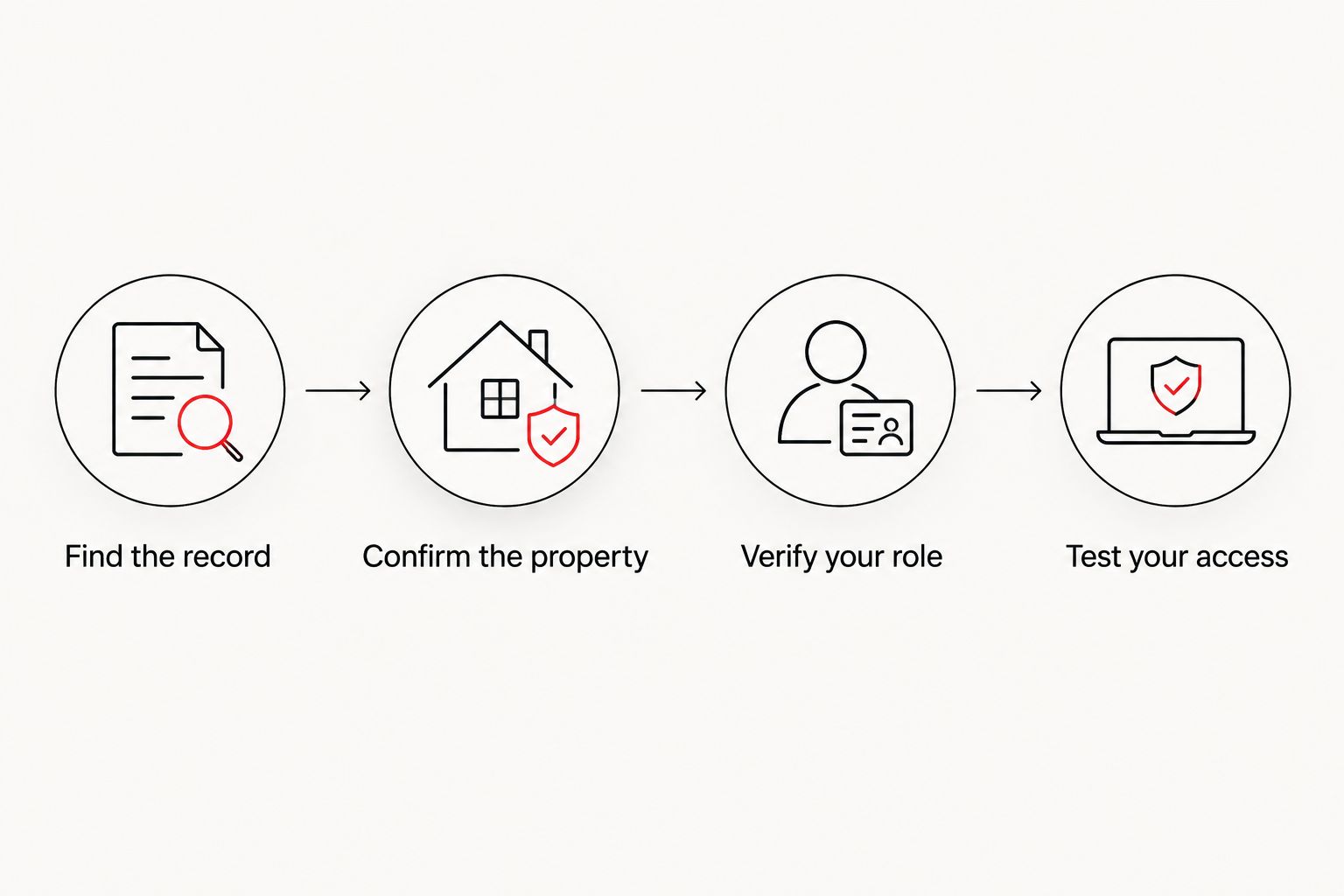
Keep a 2026 access-verification note with your project documents. Record the date you checked the account, not an assumed approval date or an expected construction start.
Track the permit whenever its status changes
You do not need to manage the application to maintain an organized project history. This second workflow suits owners who want visibility while leaving submissions and inspection coordination with the authorized applicant.
- Keep 2 separate records: the official permit information and your contractor's project schedule. A scheduled roofing visit and a county inspection result describe different events.
- Whenever the applicant reports a change, review the corresponding official record or ask for the relevant county-issued document. Save the date and a plain-language description of what changed.
- Identify whether the next action belongs to the applicant, contractor, owner, or issuing department. Put the responsible person's name beside the task.
- Before treating the job as administratively complete, confirm the permit's actual closeout status with the issuing authority. Do not substitute a finished-looking roof or a paid contractor invoice for that confirmation.
If the portal offers notifications for your account and record, follow its current instructions to enable them. Keep a manual check in your process until you have confirmed that notifications reach your email; do not assume alerts are active simply because you registered.
For a 2026 roof replacement, retain the closeout information alongside the roofing contract and other project documents. This gives you a clearer history when questions arise later.
Troubleshooting
The permit does not appear in search
Recheck the issuing authority and copy the record number from the submission confirmation. If an address search returns nothing useful, ask the applicant for the exact identifier instead of creating another application. A search problem is not a reason to submit the project twice.
You can see the permit but cannot manage it
Record visibility and management permission are separate. Ask the issuing authority which authorization process applies to your role, and identify the exact task you need to perform. Do not attempt to solve a permissions problem by using someone else's login.
The account email differs from the application contact
Ask the applicant to confirm the submitted contact details, then follow the county's documented correction or access process. Explain both email addresses to support without sending passwords. Changing an email address in your personal account does not prove that the permit's project contacts have also changed.
An uploaded document does not show the expected outcome
Check for an acknowledgment and review the record before attempting another submission. Receipt, review, and acceptance are different events. Ask the authorized applicant or permitting support to clarify the document's status rather than assuming that uploading it completed the requirement.
The roof is finished but the permit still needs attention
Read the latest record information and ask the applicant what remains unresolved. Confirm whether an inspection, correction, document, or administrative action is outstanding. Physical completion and permit closeout are separate checks.
Customize your workflow
Build a project folder around the permit number rather than an informal job nickname. Keep the application confirmation, approved project documents, county correspondence, inspection information, and closeout evidence together as they become available.
For an owner-managed tracking process, assign the contractor responsibility for explaining roofing work and the authorized applicant responsibility for permit actions. Ask each participant to confirm their responsibilities; do not infer them from portal access.
If you are still deciding what work the roof needs, review roof inspection services in Naples. An inspection question and an account-access question require different answers, so settle the roof scope before treating a permit record as proof of the proposed solution.
Discuss your roofing project
Ask about roof repair or replacement while keeping county access questions with the permitting authority.
FAQ
How do I connect my Collier County roof permit to my account?
Identify the exact permit record, establish your project role, and follow the issuing authority's current account-association instructions. If the instructions do not address your situation, ask permitting support what authorization is required.
Does finding my roof permit mean it is linked to my account?
No. Finding a permit establishes that you located a record, not that you have permission to manage it. Verify access for the specific task you need to perform.
Can I use my roofing contractor's portal login?
Use your own account rather than sharing your contractor's credentials. Ask the issuing authority how an owner or other project participant obtains appropriate access.
Why can't I find my Naples roof permit in the county portal?
Check the issuing jurisdiction and exact record number first. A Naples mailing address alone does not establish which building department issued the permit.
Does portal registration mean my roofing work is approved?
No. Portal registration establishes an account, not approval of a roofing project. Confirm the permit's actual status and applicable requirements with the issuing authority before work proceeds.
Can I track a roof permit without taking over the application?
Yes, you can organize applicant-provided updates and any publicly accessible record information without assuming application management. Ask the applicant for county-issued evidence of important milestones.
Is my roof permit closed when the contractor finishes?
Do not assume physical completion means the permit is closed. Confirm the official closeout status and resolve any outstanding requirements with the applicant and issuing authority.
One last thing
Before you spend time obtaining additional permissions, write down the question you actually need answered. If it is whether your roof passed its final inspection, ask for the official inspection result and closeout status—not access to every application function.
For your 2026 project, a clear record number, a responsible contact, and documented closeout are more useful than an account connection with no defined purpose. Verify the outcome, not just the login.